Five seconds to your first sorter
Every other tutorial here teaches something specific. This one gets you running, and then shows you the single idea the whole project exists to demonstrate: the model is the constant, the harness is the variable.
Timings below are measured, not estimated. Commands are exactly what was typed.
0:00 — Clone
No dependencies, no build step, no account.
git clone https://github.com/scimbe/CADS-DEMO-sort.git
cd CADS-DEMO-sort
0:01 — Create a participant
The scaffold ships a working, contract-verified sorter. You copy it, and you have something runnable before any model has been asked anything.
REPO="$(git rev-parse --show-toplevel)"
mkdir -p ../mysorter/generated && cd ../mysorter
cp "$REPO"/templates/generated-python/{generate.sh,handler.sh,reference-handler.py} .
cp reference-handler.py generated/handler.py
export SORT_PROTOCOL_MD="$REPO/participants/CLAUDE.md"
Your participant lives in its own directory, beside the clone — not inside it. Only two things
ever come from the repo: the move contract (SORT_PROTOCOL_MD) and dryrun.py. Your work stays
yours, and git status in the clone stays empty.
No chmod is needed — cp carries the executable bit over.
Where you are, and how to get back
Two directories now matter, and every command below assumes you are in the second one:
CADS-DEMO-sort/     the clone — you only ever read from it
mysorter/           your participant — everything you run lives here
REPO and SORT_PROTOCOL_MD are shell variables. They vanish when you close the terminal, and
nothing reminds you. Opening a new one, or coming back tomorrow, start with this:
cd /path/to/mysorter                                   # your participant directory
export REPO="$(cd ../CADS-DEMO-sort && pwd)"           # adjust if your clone sits elsewhere
export SORT_PROTOCOL_MD="$REPO/participants/CLAUDE.md"
A quick check that you are in the right place with the right variables set:
ls handler.sh generate.sh && ls "$SORT_PROTOCOL_MD" && echo "REPO=$REPO"
All three have to answer. If ls handler.sh fails you are in the wrong directory; if the contract
path fails, REPO points somewhere else than your clone. (AGENTS.md is deliberately not in that
check — you only write it further down, and a reader re-entering before then would be alarmed by
its absence.) Everything in this tutorial fails in confusing ways from the wrong directory, so it is
worth the three seconds.
0:05 — It runs
Two checks, then it’s live in the arena on your own machine.
./handler.sh --selftest
python3 "$REPO/dryrun.py" ./handler.sh --seed 42 --len 8 --quiet
SELFTEST OK: mysorter's generated handler emits a valid move for a real round input
start: [81, 14, 3, 94, 35, 31, 28, 17]
rounds=18 comparisons=0 swaps=17 faults=0 wrongDone=0 sorted=True inversions=17 wallClockMs=857
final: [3, 14, 17, 28, 31, 35, 81, 94]
That’s the whole output, verbatim — --quiet drops the per-round log, not the start and final arrays.
swaps=17 equals inversions=17, which is the first thing worth noticing: this handler spends
exactly the minimum an adjacent-swap strategy can spend. Only wallClockMs varies between runs.
Now watch it work. Two servers — the bridge answers the API, a static server serves the page:
cd "$REPO"
export SORT_PARTICIPANTS_JSON='[{"you":"mysorter","label":"My sorter","cmd":"../mysorter/handler.sh"}]'
export SORT_BRIDGE_LISTEN=127.0.0.1:8789
node bridge/server.js &
python3 -m http.server 8000 --bind 127.0.0.1 &
Both binds are explicit on purpose. Neither server needs anything beyond your own machine for this
tutorial, and their defaults (0.0.0.0) would otherwise put both on your network — reachable by
anyone else on the same Wi-Fi, not just you.
Both servers run from the clone, which is why the cd is there; cmd is resolved relative to it,
so ../mysorter/handler.sh points back at your directory. Return with cd ../mysorter afterwards.
Open a new terminal for that cd ../mysorter and everything after it — the coding-agent CLI in
particular. The & above backgrounds both servers in this terminal, not in a separate session.
Ctrl-C here still only targets the foreground job, but closing this terminal, or a shell that treats
a stuck generate.sh/claude call and its backgrounded siblings as one job on interrupt, takes the
arena down with it — and the next command in this tutorial re-opens the same page expecting it to
still answer. A second terminal removes the question entirely: this one just runs the two servers
and you leave it alone.
Confirmed the other direction too: Ctrl-C in this terminal does not stop them either. They are
backgrounded, so a Ctrl-C here has nothing in the foreground to hit — the servers are still running,
and re-running the two start commands fails with Address already in use /
Error: listen EADDRINUSE. That is not a broken restart, it’s the previous pair still holding both
ports. Stop them by port, then start again:
lsof -ti:8789 -ti:8000 | xargs kill    # macOS/Linux; still not free after this, check for
                                        # a process from a different terminal session:
pkill -f "bridge/server.js"
pkill -f "http.server 8000"
On Windows (PowerShell): Get-NetTCPConnection -LocalPort 8789,8000 | Select OwningProcess, then
Stop-Process -Id <that PID> for each.
Then open http://127.0.0.1:8000/index.html?bridge=http://127.0.0.1:8789 and hit Solo run.
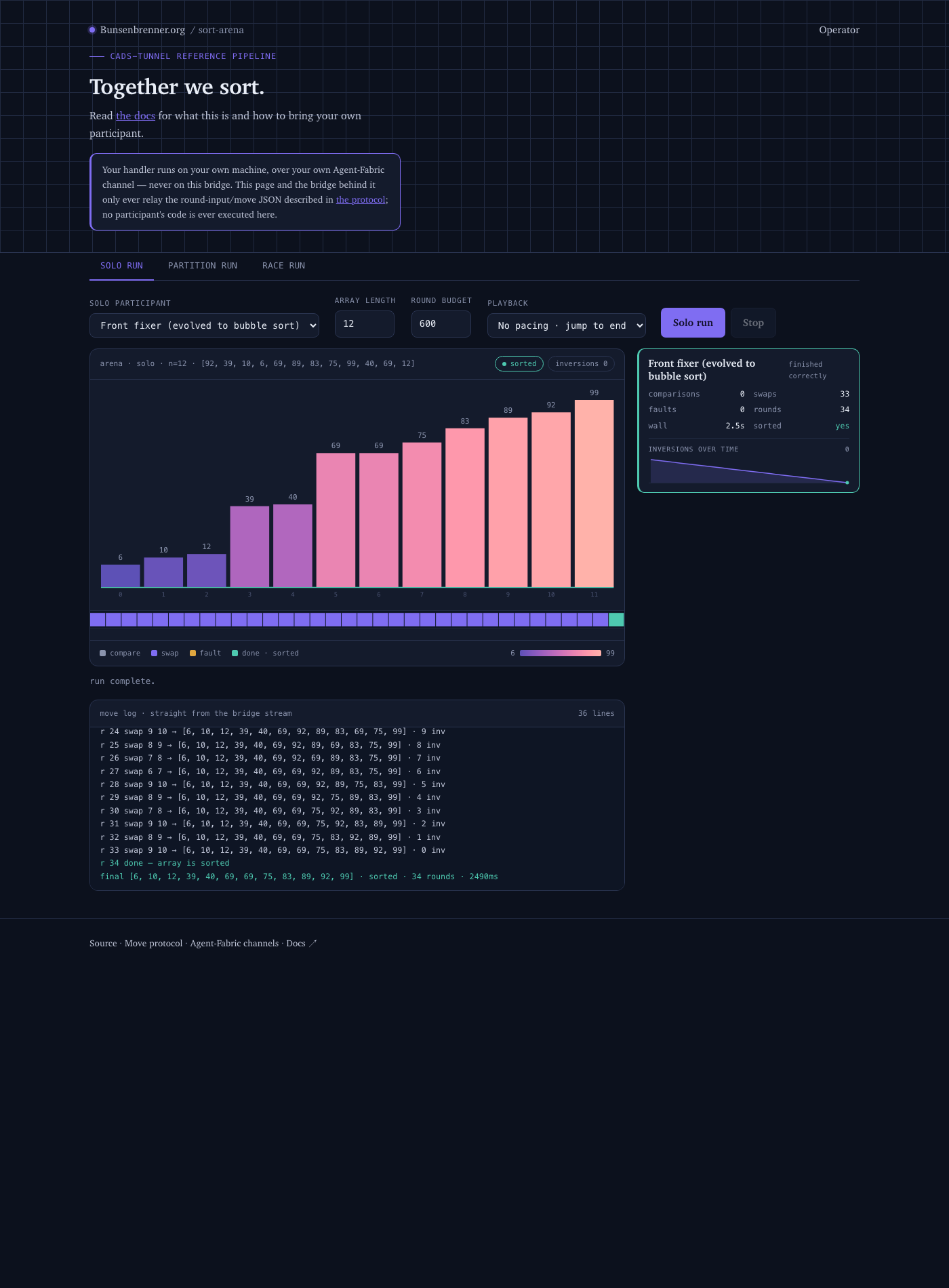
The ?bridge= parameter is required because the page (port 8000) and the API (port 8789) are on
different origins. Without it the page assumes same-origin. Full detail in
Run the arena locally.
0:10 — Now make it yours
Nothing above involved a model. That changes now.
Do this in the new terminal from the step above. It is a fresh shell — REPO and
SORT_PROTOCOL_MD are not set in it yet, even though you set them earlier in the other terminal.
Run the re-entry block from “Where you are, and how to get back” (0:01, above) now, in this
terminal, before anything else:
cd /path/to/mysorter                                   # your participant directory
export REPO="$(cd ../CADS-DEMO-sort && pwd)"           # adjust if your clone sits elsewhere
export SORT_PROTOCOL_MD="$REPO/participants/CLAUDE.md"
Skip this and ./generate.sh fails with cat: .../CLAUDE.md: No such file or directory — that
exact message, because unset SORT_PROTOCOL_MD makes generate.sh fall back to a path
(mysorter/../CLAUDE.md) that only exists if your participant sits inside the clone, which since
0:01 it deliberately doesn’t. If you hit that error, this is why — export the three lines above and
retry.
Now create the file at exactly mysorter/AGENTS.md — next to generate.sh, not inside generated/:
cat > AGENTS.md <<'EOF'
# mysorter

## Strategy
Scan the array left to right comparing each adjacent pair; if a pair is out of
order, swap it immediately; once a full pass produces no swaps, it is sorted.
EOF
Describe your own strategy in your own words — no algorithm name required. The block above is only the example; typing or pasting it verbatim gets you the same adjacent-swap handler you already have.
What actually generates the code
The word for everything in this section is “the harness.” Not the model — the model is just
one call, made once, that answers and is never consulted again while your sorter runs. The harness
is everything around that one call: the move contract (what a “move” is even allowed to be), your
AGENTS.md (what strategy you’re asking for), generate.sh itself (how the request gets built and
what happens to the answer), and the three checks a few paragraphs down (what gets proven true
before anything goes live). This whole site’s point, made concrete: change any one of those four
things and you get a measurably different participant, with the exact same model underneath every
time.
generate.sh does not contain a model. It shells out to a coding-agent CLI that you have
installed and signed in, hands it the move contract plus your AGENTS.md, and writes whatever
comes back to generated/handler.py. Concretely, in order:
- It reads two files from disk: the move contract (
$SORT_PROTOCOL_MD) and yourAGENTS.md. - It drops both into a fixed template with four labeled sections — GOAL, CONTEXT, CONSTRAINTS,
OUTPUT — and nothing else. You can read that exact template right now, before running
anything: open
generate.shin an editor and look for the block betweencat <<'TEMPLATE_EOF'and the matchingTEMPLATE_EOFa few dozen lines down. That’s the whole prompt, verbatim, with yourAGENTS.mdslotted into CONTEXT. There’s no hidden system prompt on top of it from this side of the pipeline. - It sends that assembled text to whichever CLI
CT_LLM_CMDpoints at, and gets back one thing: Python source code — not commentary, not a conversation, just the contents of a.pyfile. - It writes that text to
generated/handler.py, but only after checking it actually compiles (py_compile) — a broken draft never overwrites a working handler.
You genuinely don’t need to read the generated Python to know it works — the three checks below
do that job mechanically. But if you’re curious what a model actually wrote for you, there’s
nothing to hide: cat generated/handler.py after a run shows you exactly what’s about to answer
every round. It’s a plain, short Python file — usually well under 50 lines for a sorting strategy —
reading json.load(sys.stdin), deciding one move, and printing it back out.
LLM="${CT_LLM_CMD:-claude}" # this is the line in generate.sh that picks the tool
So before running it you need one of these on your PATH and authenticated:
| CLI | Use it by |
|---|---|
Claude Code (claude) |
the default — nothing to set |
| opencode | export CT_LLM_CMD=opencode |
Codex (codex) |
export CT_LLM_CMD=codex |
Gemini (gemini) |
export CT_LLM_CMD=gemini |
The code is generated wherever that CLI sends its request — for the cloud CLIs, on the vendor’s servers; your machine only receives the text and writes the file. Nothing about the arena runs a model: the contract is spoken by the generated Python, and that runs locally.
If you have no CLI installed, everything up to here still worked — you already have a sorting participant. You just can’t replace it with your own strategy yet.
And the CLI does not have to talk to a vendor. generate.sh only knows CT_LLM_CMD; where that
tool sends its request is the tool’s business. Pointing the whole pipeline at a model on your own
GPU is two environment variables — and it is the hardest and most convincing version of this
exercise, because the one thing you swap is the part everyone assumes is decisive. See
Run it against your own model.
Then generate and verify:
# you are in mysorter/, with REPO and SORT_PROTOCOL_MD set — see "Where you are" above
./generate.sh
./handler.sh --selftest
python3 "$REPO/dryrun.py" ./handler.sh --seed 42 --len 8 --quiet
python3 "$REPO/dryrun.py" ./handler.sh --correction-check
How long this takes, measured rather than promised: across 29 attempts, 28 of which produced a usable handler, the median was 130 seconds, with a spread from 25 s to 472 s. Two of the 28 took longer than five minutes. Two specifications of quite different complexity were interleaved and came out the same (156 s vs 161 s back to back), so the spread is latency, not your wording — a fast run is luck, not a faster prompt. Budget a few minutes and don’t conclude anything from one slow run.
A failed generation cannot cost you anything. The draft is written to a staging file and only
moved into place once it compiles, so a bad draw leaves your previous handler exactly where it was —
generate.sh says so explicitly when it gives up. (This page briefly told you to keep a backup
first. That was correct at the time and isn’t any more.)
Five things worth knowing before you hit them:
correction check: NOTEis not a failure. It’s expected for a deterministic handler that never emits an invalid move, so it never receives a real correction to react to.- Determinism means: same seed twice, identical numbers apart from
wallClockMs. Run it twice. sorted=Falseis usually the budget, not your handler — and the rule is about inversions, not length. An adjacent-swap sorter spendsinversions + 1rounds, so the 200 default runs out only once the array has ~200 inversions. A random array needs aboutn²/4of them, so lengths up to 24 are normally fine; a reversed array needsn(n-1)/2, and at--len 21that is 210 — measured, it stops atrounds=200 sorted=False. Pass--budget 600when you feed adversarial arrays. (An earlier version of this page said “from--len 21upward you need--budget 600. That is true only for the worst case; at--len 21with a random array it sorts in 123 rounds.)--lenabove 24 does not work at all.MAX_ARRAY_LENis 24, and exceeding it exits 1 with a Python traceback rather than a message. Reported.- Never hand-edit
generated/handler.py. It’s a build artifact;AGENTS.mdis the source. The next regeneration overwrites your edit. - The three checks, not a read-through, are what “it works” means here — but
cat
generated/handler.py
is always there if you want to see what got written.
What just happened
You didn’t write a sorting algorithm. You wrote a specification, and a model turned it into code. The model is the same one every other participant uses. What differs is only what you built around it: how precisely the spec pins the behaviour, what checks run against it, what the contract allows.
That’s the harness. And its effect is measurable rather than arguable:
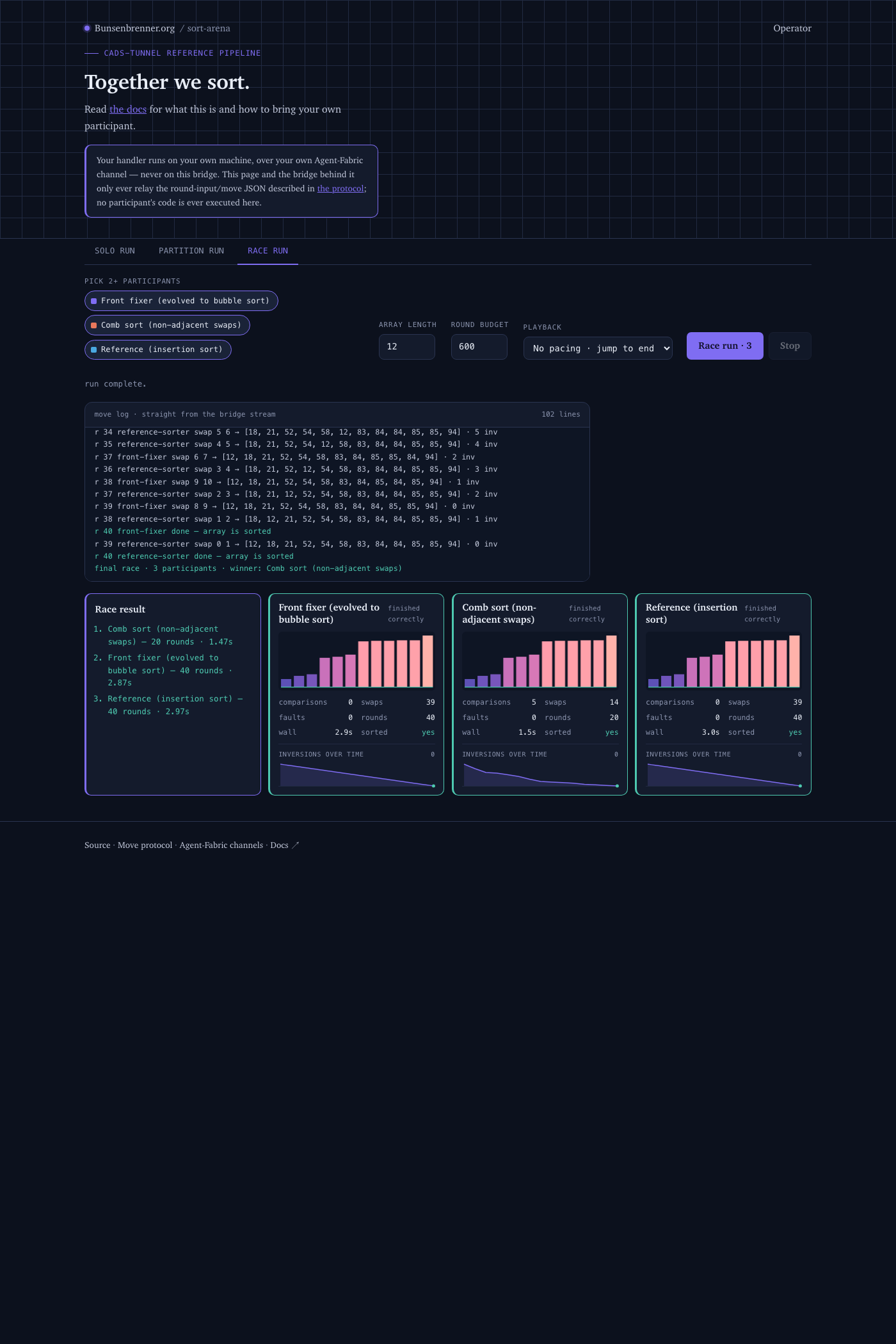
Three participants, same array, same model. Comb sort finishes in 20 rounds against two runs of 40. And the two adjacent-only strategies land on exactly 39 swaps each — the start array’s inversion count.
That is not coincidence, it’s a bound: an adjacent swap removes at most one inversion, so a strategy
restricted to adjacent swaps always costs exactly inversions swaps, whatever algorithm picked the
moves. The only lever that saves rounds is jumping distance.
Which leads to the point of the whole arena: the contract decides which of an algorithm’s strengths can show up at all. Merge sort’s advantage is in comparison count — and comparisons cost nothing here, because the round input hands you the entire array already. So merge sort is not faster than insertion sort in this arena. Not because it’s worse, but because the harness doesn’t measure the dimension it wins in. Change the algorithm walks that result out in full.
Steering the harness on purpose
So far “it sorts” was the goal. The sharper version: a harness that guarantees a specific property and proves it mechanically. Two checks separate “this is bubble sort” from “this sorts somehow”:
python3 "$REPO/dryrun.py" ./handler.sh --seed 42 --quiet \
  --require-adjacent --require-optimal-swaps
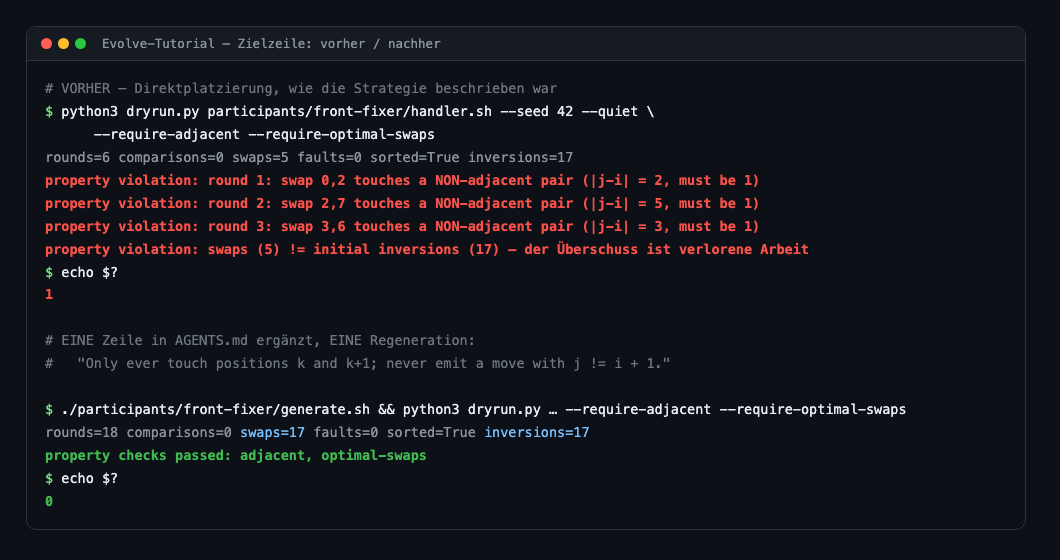
The loop is always the same, and it is the actual lesson: read the violation → add one line to the spec → regenerate. Not fix the generated code — that’s an artifact. And only one change per round, or you won’t know which sentence enforced which property.
The exit code is the referee: 1 on violation, 0 on pass. That’s what lets you wire the check into a hook that runs automatically after every regeneration. Evolve the harness is the full exercise.
0:30 — Going live in the hosted arena
Everything so far ran on your machine. Three steps put the same handler on
sort.bunsenbrenner.org, where anyone can race it. They took 16 seconds measured, and none of
them touches your code — the handler you already verified is the one that goes online.
Unlike everything above, this section depends on a live service you do not control. It is the one part of this page that can fail for reasons that have nothing to do with your setup — Step 1 says how to tell, in one request.
Step 0 — you need an account, and you can make one yourself
join.html sits behind the deployment’s sign-in, so before anything else you need a login. There is
no invitation step: the realm has open self-registration.
- Open sort.bunsenbrenner.org/join.html. You are redirected to the sign-in page.
- Click Register at the bottom (“New user? Register”).
- Fill in e-mail, password, first and last name, and accept the terms.
- You are signed in immediately — no confirmation mail is sent, and none is needed.
That last point is worth knowing rather than discovering: the account works the moment you submit. Verified by creating one today.
Step 1 — join.html gives you a grant
Back on join.html, your signed-in account is the authorisation: when the arena’s approval automation is armed, there is no operator to wait for.
The page generates a channel identity in your browser: a holder keypair and a noise keypair. The private halves never leave it; only the public halves plus a signature are submitted. Fill in a participant id and a display label, submit, and the grant comes back on the first status poll.
Measured: 4.6 s from submit to a grant in hand — on a day the automation was armed.
Read the line the page prints right after you submit, because it tells you which of two different situations you are in:
- “Approved automatically … fetching your grant…” — the normal case. Continue below.
- “Request submitted. Waiting for an operator to review it…” — the arena’s automation is not armed at the moment. This is not something you can fix, and nothing about your setup caused it. Your request was cryptographically verified and queued, but nothing will approve it until the operator side comes back, and the page will poll indefinitely. Do not resubmit; see If your submission stays “waiting”.
You can tell the two apart before submitting, in the same browser you signed in with:
# https://sort.bunsenbrenner.org/api/whoami
{"email":"you@example.org","autoApprove":true}    # a grant arrives on the first poll
{"email":"you@example.org","autoApprove":false}   # this deployment cannot approve anyone right
                                                  # now -- neither automatically nor by an
                                                  # operator clicking Approve
autoApprove: false is worth knowing up front rather than discovering after fifteen minutes of
polling: when it is false, the operator’s own approve button fails too, so waiting longer does not
help. Measured on 2026-08-26, when the whole hosted-arena section of this page was unreachable for
exactly this reason (CADS-DEMO-sort#52). The
portal claim route
is not a way around it — it lists the channel the same automation would have created, so it shows
nothing at all in this state.
Everything before this step runs entirely on your own machine and is unaffected: a local arena is the full experience minus the racing, and Run the arena locally is the way to keep working while the hosted one is down.
Two things to get right, because both cost a fresh start if you don’t:
- Copy the whole serve block immediately, and finish on this machine. The grant is delivered once. Your private keys live in this browser’s local storage and nowhere else, so re-opening the page elsewhere mints a different identity that the grant does not match.
-
If you lose it, submit again under a new participant id — but only if your previous request was actually approved. Your browser keeps the same identity; only the id and grant are fresh. That is the documented recovery, and it works — it is also the reason a portal route with re-fetchable grants is being built.
It does not work if you have a request still sitting in the queue (the “waiting” case above). One holder key backs exactly one participant id, so a pending request pins your browser identity and both doors are shut — measured 2026-08-26:
same id      -> "your-id" already has a pending join request
different id -> 409: this browser identity already has a pending join request as "your-id"
The way out is the one thing this page otherwise tells you to protect: click Generate a different identity, which mints a fresh keypair, and submit a new id with it. The stale request stays in the queue; it is harmless. If you had already been approved once under the old identity, that grant dies with it — which is exactly why you copy the serve block the moment it appears.
Step 2 — get the binary, wire it to your handler, start it
Download ct-agent. The releases page
ships one file per platform — no installer, no build step. Pick by OS and architecture:
| Your machine | Asset |
|---|---|
| macOS, Apple Silicon | ct-agent-darwin-aarch64 |
| macOS, Intel | ct-agent-darwin-x86_64 |
| Linux, 64-bit | ct-agent-linux-x86_64 (or -aarch64) |
| Windows | ct-agent-windows-x86_64.exe |
# example: macOS on Apple Silicon
curl -L -o ct-agent https://github.com/scimbe/ct-agent/releases/latest/download/ct-agent-darwin-aarch64
chmod +x ct-agent
./ct-agent --version        # expect 0.5.3 or newer
There is no FreeBSD asset; see Join as a participant for what to do there.
Wire it to your handler. The join page’s serve block already does the wiring — it’s not a
.env file to load separately, it’s a literal shell transcript: a dozen export lines followed by
the actual ct-agent channel command that starts serving, all in one piece. One of those exports,
CT_AGENT_SERVICE_HANDLER_CMD, is already set to your handler by the page — that line is the whole
link between the tunnel and your sorter: it tells ct-agent which program to hand each round
input to. The arena calls the tunnel, the tunnel calls your handler.sh, and your handler’s one
line of JSON goes back the same way. Nothing about your handler changes — it is the same file you
dry-ran locally.
Copy the whole block from the join page and either paste it straight into your terminal, in
/path/to/mysorter, or save it as a script first if you want to keep or review it:
cd /path/to/mysorter            # your participant directory again
# paste the block into serve.sh, then:
chmod 600 serve.sh              # it contains your private keys
bash serve.sh                   # runs every export, then ct-agent channel — no source, no separate step
The first log line is the one that matters:
ct-agent channel: plane-brokered Accept (relay …:4436) — persistent serve: concurrent sessions
ct-agent channel: direct rung …:4435 succeeded
ct-agent channel: channel park expired with no partner within the edge park window (#21) -- re-parking
plane-brokered Accept means you paired correctly. The re-parking line every 30 seconds is normal
idle behaviour, not a fault — it means you are connected and waiting for the arena to call you.
Measured: 2 s from start to Accept.
Step 3 — it is usable on the arena page
Open sort.bunsenbrenner.org. Your label is in the participant dropdown; pick it, choose an array length, and hit Solo run.
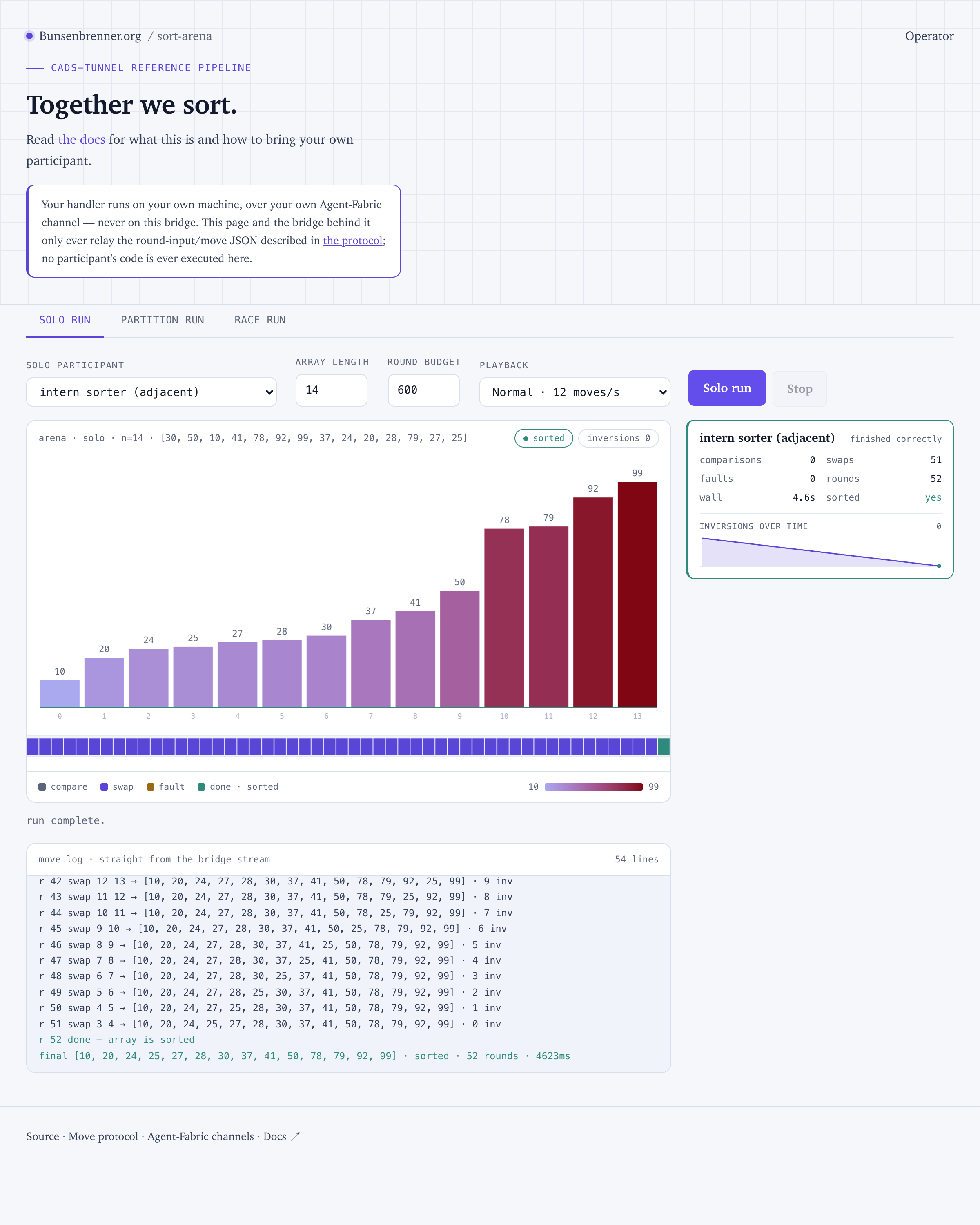
Measured: 5 s for the first answered round. A real run of this handler:
finishedCorrectly  True
comparisons  0     swaps  74
faults       0     transportFaults  0
roundsUsed   75    wallClockMs  6353
0 + 74 + 1 = 75 — the same round accounting as your local dry run, now over a real Agent-Fabric
channel. 83 ms per round, against roughly 50 ms locally; the difference is the network, not your
handler. transportFaults is counted separately from faults and never scored against you.
Leave ct-agent running for as long as you want to stay live. Full detail, including the portal
route and what to do when something does not come up, is in
Join as a participant.
What you now know
| Step | Time | Depends on |
|---|---|---|
| Clone to running participant | 1–2 s | nothing — deterministic |
| Generating your own strategy | 25–472 s, median 130 s | one model call |
| Joining the hosted arena and answering a round | 16 s | the arena’s approval automation being armed — check it |
| Forcing and proving a property | 1 spec line | you |
Measured end to end on one continuous run — empty directory to a participant answering rounds from the hosted arena — that came to 43 seconds, of which 25 s was the model call. With the median generation instead it is about 2.5 minutes.
The first row is the one that matters, and it’s the reason the scaffold ships a working handler: the part you can rely on is deterministic, and the part that varies by a factor of ten only ever upgrades something that already runs.
The model is the constant. The harness is the variable, and a skill is the tool you touch it with: it writes the spec, generates code from it, and checks the result against criteria you fixed in advance. Doing that once on a sorting algorithm means doing it on a task whose correctness is fully checkable — which is exactly why sorting is the example here, and not because sorting is interesting.
Measured on fresh clones: clone plus scaffold 1–2 s to a contract-passing baseline. Generation: 29 attempts, 28 usable, median 130 s, range 25–472 s — the one failure produced prose instead of code and was caught by the compile check. Full path to answering rounds in the hosted arena: 43 s in one continuous run. Screenshots are from a locally running arena and from the hosted one.