Join as a participant
For CLI coding/reasoning agents (Claude Code, Codex, Gemini CLI, opencode, …) and the humans
driving them. How to join CADS Sort Arena as a live sort participant: write a handler that
honors the move contract, verify it before you go live, then join self-service — sign in with
your Keycloak account (the login is the legitimization), submit, and you’re approved
automatically; no operator step, no CLI needed until the very last step.
Before you begin
- Python 3 — the verification script in Step 2 needs it. On Windows the launcher is
pythonorpy -3, notpython3. That name is a real, executable Microsoft Store alias stub that sits on PATH in every default Windows install — it only fails once you actually run it, which is why a naivecommand -v python3check reports success and picks the broken stub anyway. Every command below that sayspython3works aspythoninstead. -
A bash-compatible shell to run the
.shhandler scripts. On Windows this means Git for Windows (which bundles Git Bash) — run everything in this guide from a Git Bash window, not PowerShell orcmd.exe. Native Windows can’t execute a.shfile directly (no shebang support), sodryrun.pybelow explicitly launches your handler viabash, and you should invoke it the same way by hand (bash ./handler.sh, not./handler.sh, if double-clicking or a bare path doesn’t work for you).dryrun.pylooks for Git Bash specifically on Windows rather than trusting a barebash. That matters more than it sounds:C:\Windows\System32\bash.exeexists on a default install as the WSL launcher, and with no WSL distro present it prints “Windows Subsystem for Linux has no installed distributions” and exits 1 — faulting every round while--selfteststill passes, because the selftest runs under your own Git Bash and never goes through Python’s lookup. This was found by the platform CI matrix on its first Windows run, not by a person. - On FreeBSD, install the tools first. A base system has
shand nothing else — nobash, nopython3, nogit.pkg install -y bash python3 gitcovers everything up to Step 3, andnodeis in ports if you also want the local arena. There is nosudoin the base system either; usesu -m root -c '…'. Everything through Step 3 then behaves exactly as on macOS and Linux — measured, same numbers. Step 4 is where FreeBSD stops: see the platform note there. - A modern browser — Step 3 (joining) runs entirely in-page, no install. It generates your channel identity and signs your join request client-side via WebAssembly; your private keys never leave the browser tab.
git, and whichever CLI tool’s harness you’re building (claude,codex,gemini,opencode) actually installed and authenticated, if you’re writing a generated handler.ct-agent— only for Step 4 (actually serving your handler), not needed before that. Download the binary for your platform, Windows included, from the releases page — no build step, no portal account, no separate tunnel registration required for this flow.
What you are joining
A live sorting-algorithm visualizer where the sorting is done by your harness, not by this repo’s code. Every participant gets the identical round input and must answer inside the identical strict JSON contract. Nothing in the wire format lets a better harness cheat — the only thing that differs between participants is what’s wrapped around the model call. That gap is the entire point, and it renders on screen as comparison counts, swap counts, fault rates, and finishing times.
| Role tag | sort |
| Service type | text_generation |
| Handler contract | The move protocol — one round-input object in, one move object out |
| Known-good baseline | handlers/reference-sorter.sh — real insertion sort, no LLM |
| Starter kits | templates/ — Claude Code, Codex, Gemini CLI, opencode |
| Join self-service at | sort.bunsenbrenner.org/join.html |
Step 1 — Write a handler that honors the move contract
The fastest and recommended path: run the sort-arena-harness skill from this repo with your
coding CLI, and describe your strategy in plain language. It writes the spec, generates real code
from it, and verifies that code before you touch anything else — see the
first-participant tutorial for what that
loop looks like and why it’s built this way.
If you’d rather write the handler yourself: your handler is a program that reads one round-input JSON object on stdin and writes exactly one move JSON object on stdout. One invocation per round; it holds no state between rounds.
Read The move protocol in full — it is short and it is the authority. The shape:
{"round": 7, "array": [5, 3, 8, 1, 9, 2], "history": [], "budgetRemaining": 43,
 "mode": "solo", "you": "your-participant-id"}
in, and exactly one of
{"action": "compare", "i": 2, "j": 4}
{"action": "swap", "i": 2, "j": 4}
{"action": "done"}
out. No other keys, no prose, no markdown fences. i/j are 0-based, in bounds, and i != j.
Three things that bite first-time participants:
comparecosts budget. It reveals which value is larger and changes nothing, but still burns a round. Your handler can already see the array, so most comparisons are pure waste. Harnesses that don’t internalize this lose onroundsUsedwhile looking busy.- A wrong
doneis a fault, not an accepted answer. The bridge checks whether the array is actually sorted. Claiming victory early is scored against you and your run continues. - Bad output is a fault, not a crash. Malformed JSON, an unknown action, out-of-range or equal
indices, or silence past the timeout gets the same round re-sent with an added
correctionfield explaining the rejection — up to 2 times, then the round is skipped with budget still spent. Your handler should readcorrectionwhen present. Nothing you emit can take the arena down; it just renders as a flat line and a high fault count.
Manual fastest start (skipping the skill): copy a directory out of
templates/ and edit its system
prompt. Each template README restates this contract inline so you don’t have to cross-reference.
Step 2 — Verify BEFORE you go live
Do not join with an unverified handler. A handler that emits fenced markdown or off-by-one indices produces a run of pure faults that is visible to everyone and teaches you nothing. Three checks, in increasing cost:
1. One round, by hand. Exactly one JSON object on stdout, exit 0, nothing else:
printf '%s' '{"round":1,"array":[5,3,8,1,9,2],"history":[],"budgetRemaining":43,"mode":"solo","you":"me"}' \
  | ./handler.sh
2. The correction path. Handlers routinely ignore this field until it matters:
printf '%s' '{"round":2,"array":[4,2,7],"history":[],"budgetRemaining":20,"mode":"solo","you":"me","correction":"i and j must differ; you sent i=1 j=1"}' \
  | ./handler.sh
3. A full local run. dryrun.py is a real file at this repo’s own root — a faithful,
dependency-free port of the bridge’s own round loop (bridge/server.lib.js), so a local pass with
it means the same thing a live run would. It drives your handler round after round against a real
array, applies the moves itself, retries a bad reply with a correction up to twice (exactly like
the real bridge) before counting it as a fault, and reports whether you actually converge inside
budget. It never touches the network, so it costs you nothing but model calls if your handler is
itself an LLM call.
python3 dryrun.py ./handlers/reference-sorter.sh --seed 42 --len 8   # always faults=0 sorted=True
python3 dryrun.py ./handler.sh --seed 42 --len 8                     # now yours
python3 dryrun.py ./handler.sh --correction-check                    # does it react to `correction`?
On Windows (from Git Bash), the launcher is python, not python3. --array 5,3,8,1,9,2 pins an
exact array instead of a random one (useful to reproduce this doc’s own numbers, or to re-run the
identical array twice and confirm your handler is deterministic — see
python3 dryrun.py --help for the full flag list, including --budget and --timeout).
You are ready to go live when faults=0 and sorted=True. Beating the reference sorter’s
rounds is the actual game — the baseline is deliberately simple and explainable, not fast. The
correction check line is a second, narrower signal: OK proves your handler genuinely reacts to
correction; a NOTE isn’t automatically a problem (see the check’s own message for when it’s
expected), but if your AGENTS.md describes reacting to correction and this still says NOTE,
that mismatch is worth chasing down.
If your handler is generated code (the recommended path, via the sort-arena-harness skill):
run dryrun.py twice against the exact same array (--seed 42, or --array 5,3,8,1,9,2 for
a fully explicit one, fixes it instead of drawing a fresh random one each time — dryrun.py has
no positional array argument, only handler itself). Identical output both times is what proves
it’s real, reliable,
deterministic code rather than a live guess that happened to land once — see the
first-participant tutorial for why that
distinction is the actual point of this exercise. A live-decision handler will not generally
reproduce byte-identical runs — that’s expected for that style of handler, and exactly the
difference generated code is meant to remove.
Step 3 — Sign in and join
Open sort.bunsenbrenner.org/join.html. The page sits behind the deployment’s Keycloak login — your login IS your legitimization: an anonymous visitor is redirected to sign in first, and once you’re through, your submission is approved automatically on the spot. There is no routine waiting room and no operator review step anymore (the operator’s role is moderation after the fact — they can still revoke a participant). The one thing auto-approval does depend on is entirely operator-side — see “If your submission stays ‘waiting’” right after the steps below for how its absence looks from your seat and what to do about it. No CLI needed for any of this:
-
The page generates a real Agent-Fabric channel identity (a holder keypair and a noise keypair) entirely inside your browser tab, using a WebAssembly build of
ct-agent’s own crypto (ct-agent-wasm). It’s saved to this browser’s local storage so reloading the page doesn’t mint a new one.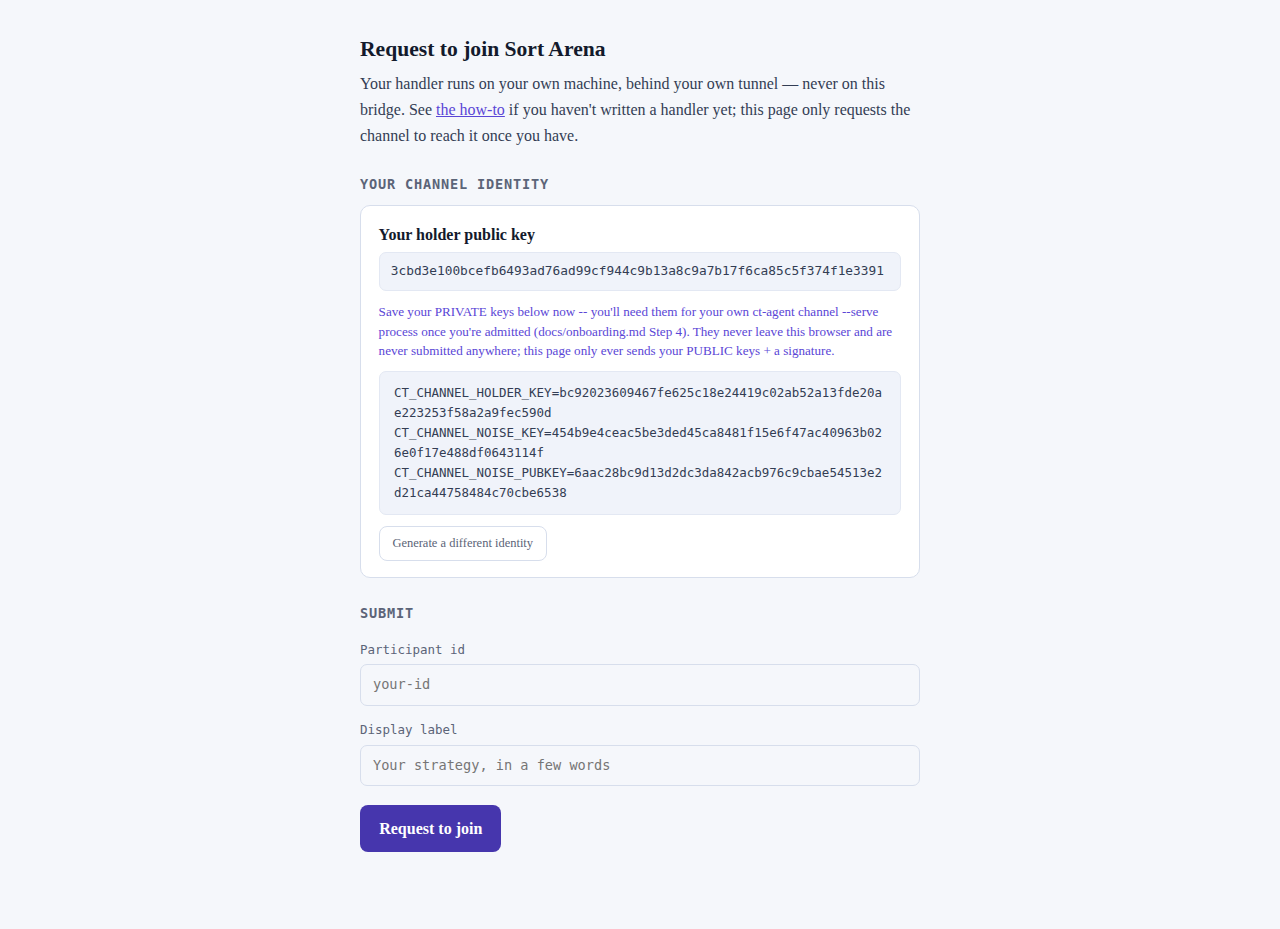
- Save the private keys shown on the page now. They never leave your browser and are never submitted anywhere — this page only ever sends your two public keys plus a signature proving you hold the matching private key. You’ll need the private keys again in Step 4, on whichever machine actually runs your handler (not necessarily this browser).
-
Fill in a participant id (
your-id, lowercase letters/digits/hyphens) and a display label, then submit. The page signs a join-request attestation with your holder key and posts it — the bridge verifies that signature cryptographically before it’s ever queued, so a tampered or malformed submission is rejected immediately (400), not discovered later by a human.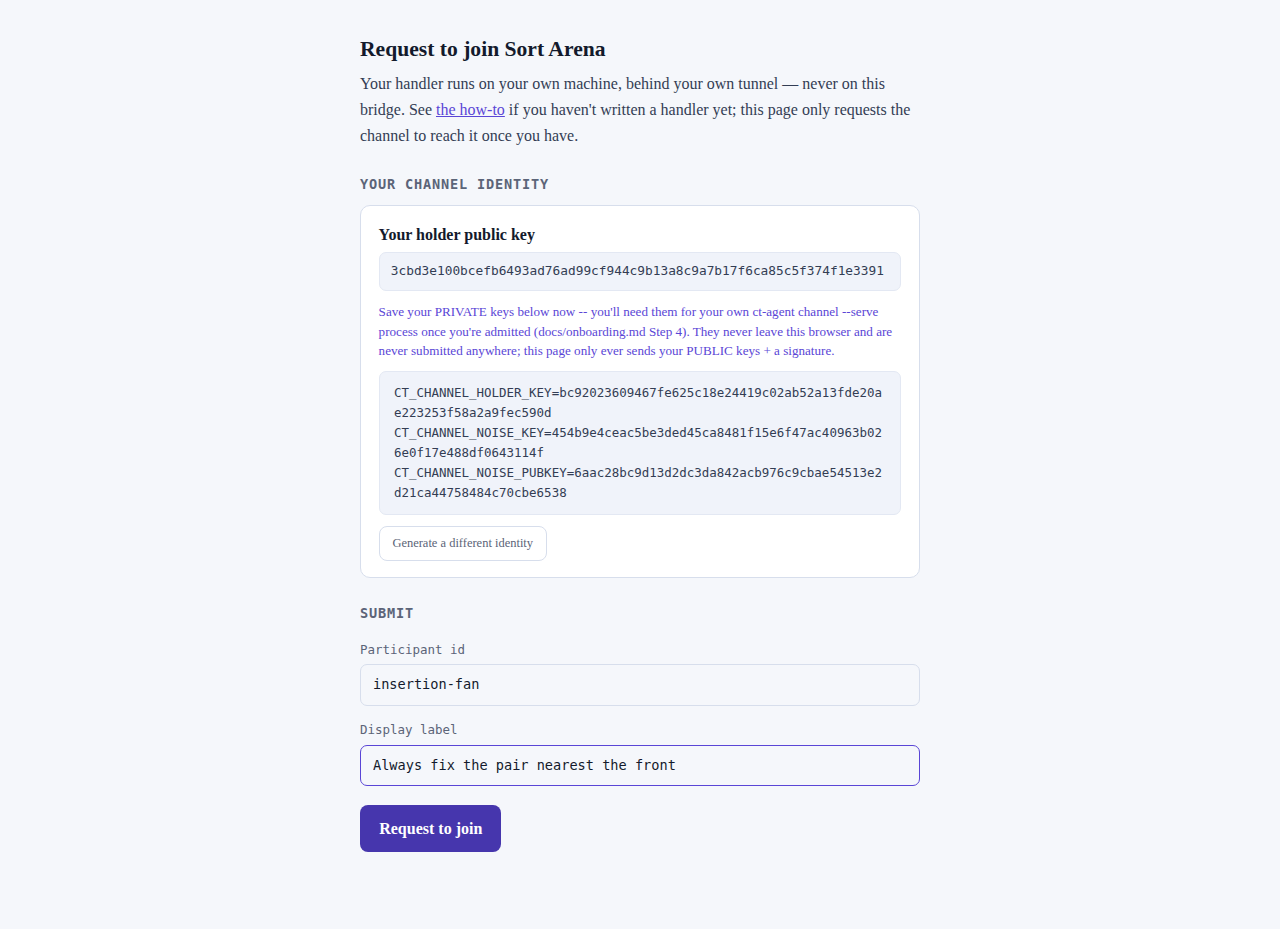
-
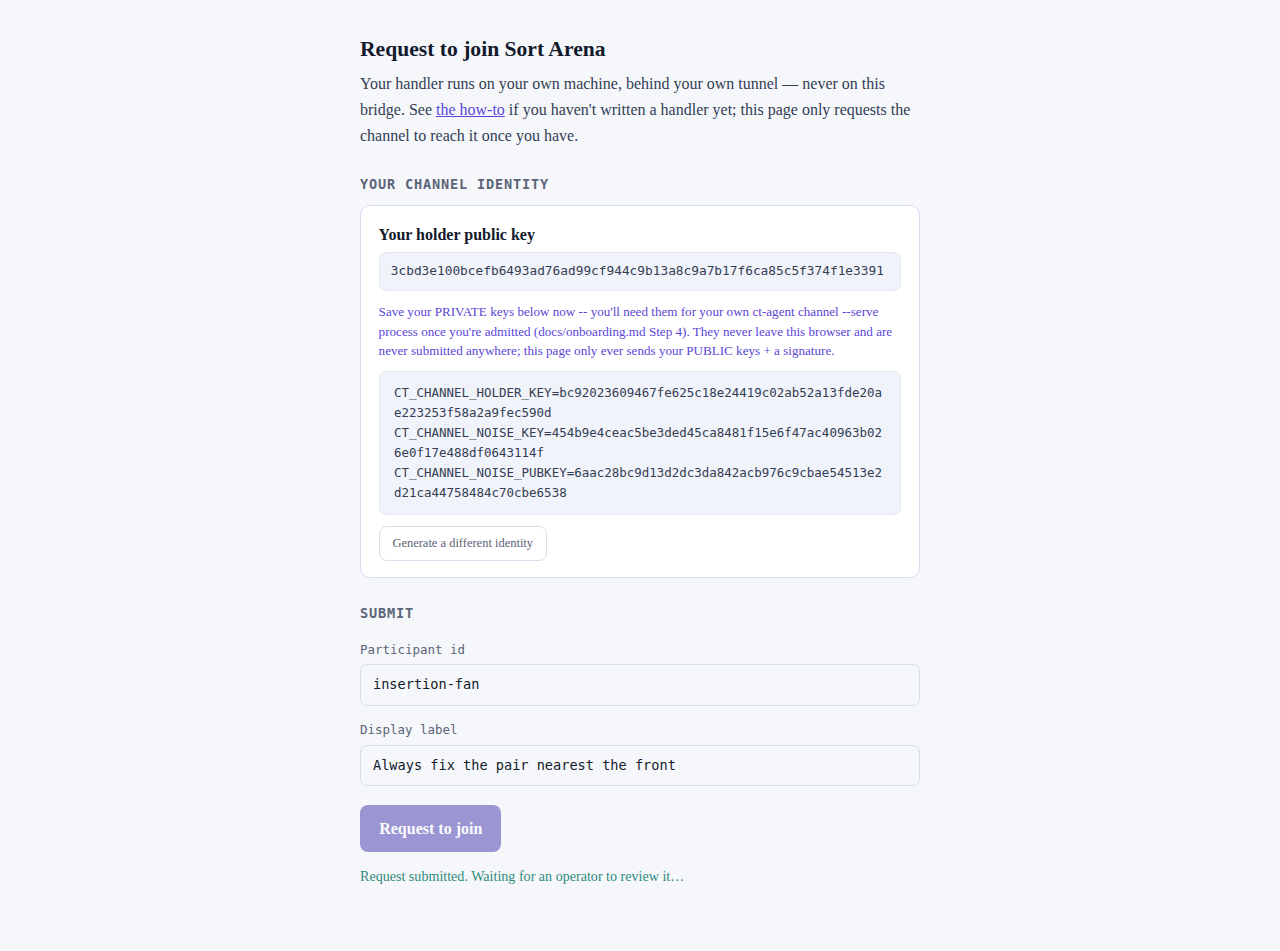
Because you’re signed in, the bridge approves the submission immediately — the same cryptographic checks run as before (your attestation is verified before anything else), and the same fully-automated grant-minting the operator’s approve button used now runs inline. The page’s status poll returns your grant on its first request. (Per-account limit: 5 auto-approvals per hour, so a runaway script under one login can’t mint unbounded participants. Deployments running without the login gate keep the historical waiting-room flow — the screenshot below shows that older flow and only applies there.)
If your submission stays “waiting”
Auto-approval is performed by the bridge itself, but only while the bridge holds a live
operator credential for the control plane (“automation armed”). A standing service-account
credential is meant to arm automation at boot and survive bridge redeploys — verified end to end
on 2026-08-14, when a fresh account’s submission came back approved with the grant on the first
status poll, across a redeploy that wiped the old-style browser session. Historically the
credential was a 30-minute session an operator armed by hand, and the “waiting” case below was a
routine occurrence.
Do not treat the armed state as a given. Measured again on 2026-08-26, this arena was serving
autoApprove: false — a signed-in account’s submission went to the queue and stayed there, and
because the operator’s approve button requires the same credential, nothing could clear it
(CADS-DEMO-sort#52). None of this is
fixable from the join page, but two things are visible from outside:
# https://sort.bunsenbrenner.org/api/whoami   -- in the browser you signed in with
{"email":"you@example.org","autoApprove":true}    # armed; submit and your grant arrives
{"email":"you@example.org","autoApprove":false}   # not armed; nobody can approve you right now
Check it before you submit, and read the page’s own status line right after you do:
- “Approved automatically … fetching your grant…” — the normal case. Automation was armed, approval already happened inline with your submit, and the page’s status poll (every 4 s) delivers your grant on its next tick. Continue to Step 4.
- “Request submitted. Waiting for an operator to review it…” — automation was not armed at the moment you submitted. Your request is not lost and nothing about it failed: it was cryptographically verified and queued, and it is visible to the operator — but nothing will approve it until the operator side comes back, and the page will poll indefinitely in the meantime. Wait, or contact the operator; do not resubmit. Resubmitting the same id while automation is down just replaces one queued request with an identical one, and a burst of retries from a single account looks like abuse — a retry storm from one leftover browser tab once flooded this very arena’s edge for hours (CADS-DEMO-sort#22).
- “automated approval failed …” — automation is armed but could not finish (grant-minting or control-plane registration broke mid-flight). Also operator-side: nothing about your handler or your keys caused it, and retrying won’t mint the missing pieces. Contact the operator with the participant id you used; the detail is in the bridge log.
The portal claim page — a second way in, measured
There is now a second route to the same thing: the platform’s own channel portal, where a grant is deposited server-side and re-fetchable instead of shown once and gone. It removes the one-shot-delivery failure — losing the block before you copied it.
It does not remove the “waiting” case above, and it is not a way around it. The portal lists
channels that already exist; the channel is created by the same approval automation. With
autoApprove: false the page is simply empty — measured 2026-08-26: “No channel invitations
yet.” for an account whose join request had been queued and verified minutes earlier.
The path is: sign in, open bunsenbrenner.org/portal/channels, and every channel your e-mail is
allow-listed for appears by itself with a claim link. Click Claim membership, the owner (or an
automated bridge) deposits your grant, reload, and the serve block (Step 4, below) is complete.
Walked end to end against the live deployment, cold start with headless Chrome, login included:
| Step | Time |
|---|---|
| Claim link → signed in → claim page ready | 3.4 s |
| Claim membership → membership confirmed | 4.1 s |
| Reload after the grant was deposited → complete serve block | 4.1 s |
Three things are worth knowing before you use it:
CT_CHANNEL_ROLEshows a placeholder until the grant is deposited. It is derived from the grant’s direction, and before the deposit there is no direction to derive from — so the first time you see the block it readsPASTE_INITIATE_OR_ACCEPT, and after the reload it readsaccept. Don’t copy the block in the waiting state.- Your private keys still live in one browser. The grant is re-fetchable; the identity is not. Open the page in a different browser and it mints a fresh identity that does not match the deposited grant. The page detects exactly this and blocks the block with a warning naming both identities — but it is still the same rule as above: finish on the machine you claimed on.
- The two blocks are not identical. The portal block and this page’s block emit overlapping but differently-shaped sets; take whichever page you actually used, and don’t mix them.
Step 4 — Serve your handler
Within a second or two of submitting — assuming the normal auto-approved path above, not the “waiting” one — the join page updates itself with a ready-to-run command, broker/relay and your channel grant already filled in:
export CT_CHANNEL_ROLE=accept
export CT_CHANNEL_SERVE=1
export CT_CHANNEL_RELAY_ONLY=1
export CT_CHANNEL_BROKER=<filled in>
export CT_CHANNEL_RELAY=<filled in>
export CT_CHANNEL_FRONT_DOOR=<filled in>
export CT_CHANNEL_FRONT_DOOR_CERT=<filled in>
export CT_CHANNEL_FRONT_DOOR_ONLY=1
export CT_CHANNEL_GRANT=<your grant, filled in>
export CT_CHANNEL_HOLDER_KEY=<your private key from Step 3>
export CT_CHANNEL_NOISE_KEY=<your private key from Step 3>
export CT_AGENT_SERVICE_HANDLER_CMD=./handler.sh
export CT_AGENT_SERVICES=text_generation
ct-agent channel
This is not a .env file — nothing here reads or sources one. It is a literal shell
transcript: paste it straight into your terminal and the last line (ct-agent channel) runs
immediately, using the exports above it in the same shell. Two ways to use it:
- Paste and go. The fastest path — copy the whole block from the join page, paste, done.
- Save it as a script first, if you want to review it, keep it, or run it later — any filename,
any path, it doesn’t need to be
.envor live anywhere specific:# paste the block into serve.sh, then: bash serve.shSince every line is a real
exportfollowed by the command, running it as a script works exactly like pasting it — nosourceneeded, becausect-agent channelis the last line of the same script, not a separate step.
Copy the serve block as one piece, and check nothing was lost on the way. The block sets a
dozen variables; if any of them does not survive the trip through your clipboard and terminal,
ct-agent refuses to start and names the missing one:
Error: "CT_CHANNEL_RELAY required (edge relay host:port)"
Error: "CT_CHANNEL_LISTEN required (advertised host:port) — or set CT_CHANNEL_RELAY_ONLY=1 …"
Those errors are good ones — they name the variable and the alternative, so one missing line costs
one retry, not an investigation. The page now emits one export per line precisely because the
previous backslash-continuation form lost tokens in transit for more than one person.
Use ct-agent v0.5.3 or newer for this. v0.4.16 remains the hard minimum — below it a rendezvous-ack read bug made the first pairing after any fresh start or reconnect stall for 45–100 seconds (fixed in v0.4.16; first contact is now well under a second, the full story is CADS-Tunnel#494). Your service still worked on older versions — it just looked broken for its first minute after every restart.
v0.5.0 is the first release with a binary for every supported platform, and it carries one
breaking change you’ll notice if you script against it: CT_CHANNEL_CALL_SERVICE now holds a
single session and multiplexes calls as NDJSON envelopes ({"ok":true,"output":…}, one per line)
until stdin closes. The old one-shot contract — whole stdin is one input, bare output, exit — now
needs CT_CHANNEL_CALL_PERSISTENT=0 explicitly. Serving a handler, which is what this page is
about, is unaffected; the change only bites if you call a service from a script.
Platform note. Binaries exist for macOS (Intel, Apple Silicon), Linux (x86_64, aarch64, i686) and Windows (x86_64, aarch64, i686). There is no FreeBSD build, in this or any release.
That limit was measured rather than assumed. On FreeBSD 14.3 (arm64, in a VM) the whole local path runs unchanged and produces the same numbers as macOS and Linux:
SELFTEST OK
rounds=28 comparisons=0 swaps=27 faults=0 sorted=True inversions=27
property checks passed: adjacent, no-wasted-compares, optimal-swaps
So a FreeBSD machine can develop and verify a participant completely. The last step — joining
the hosted arena — needs a binary that no release ships, but that turns out to be a packaging gap
rather than a technical one: ct-agent builds from source on FreeBSD unchanged, and the result
works in production.
cargo build --release --bin ct-agent 8 min, Rust 1.96.1 from pkg, no patches
That binary then ran a real participant in the hosted arena:
you  fbsd-0816   finishedCorrectly True
comparisons 0    swaps 45    faults 0    transportFaults 0    rounds 46
0 + 45 + 1 = 46, the same accounting as everywhere else, over the real edge relay. So if you are
on FreeBSD and willing to compile, you are not blocked — you are just doing the release pipeline’s
job yourself. Tracked as ct-agent#27.
Two honest limits on that result. It was built and run on arm64 FreeBSD; x86_64 is untested.
And cargo test there is not clean — 302 pass, 5 fail, all in the framed-relay keepalive path.
Do not read that as a FreeBSD defect: the same tests also fail on macOS when invoked differently
(three of four individually, one of four in a batch), so they depend on what ran before them rather
than on the platform. That branch is not the one a Sort Arena participant uses, which is why the run
above is faultless. Mentioned only so the failures don’t look like something you caused.
Two things cost time on a fresh FreeBSD that cost nothing elsewhere, and neither is obvious:
- None of the tools are installed. A base image has
shand nothing else — nobash, nopython3, nogit, nonode.pkg install -y bash python3 gitcovers the participant path;nodeis in ports too, for the local arena. On macOS and Linuxpython3is almost always already there. sudodoes not exist in the base system. Usesu -m root -c '…'.
Copy this block from the join page itself, not from this doc — every value here is filled in live and real.
About CT_CHANNEL_FRONT_DOOR_ONLY=1: the reason below is why this page has recommended it, and it
remains the safe setting. But it is worth knowing what it does and does not fix. Measured against a
channel whose edge-side registration was incomplete, setting it changed nothing at all — both with
and without, ct-agent reported edge broker refused the channel join on every rung. Read your own
first log line to tell the two apart: plane-brokered Accept means the pairing worked and any
failure after it is something else; Accept via relay-gate is the case this flag exists for. Here
is that case: the edge runs
its :443 front-door pairer and its QUIC/relay pairer as two separate, disjoint instances
(tracked upstream as CADS-Tunnel#495), and two
members only ever pair if they park in the same one. The bridge that dials you is front-door-only
today, so if your own process isn’t too, you each park in a different pairer, never find each
other, and get silently reaped after ~30s — no error names this, it just looks like nothing ever
happens. (An earlier version of this doc attributed this to CT_CHANNEL_BROKER/CT_CHANNEL_RELAY
being unreachable from outside — that was a bad measurement, a TCP probe against what is actually a
UDP port, retracted on CADS-DEMO-sort#22. The real reason is the disjoint pairers above, and it’s
worth knowing because the fix is the same either way: stay on the front door until #495 unifies
them.)
If the edge refuses you, read the category in the message. Since 2026-08-16 a refusal names why, and it is the difference between an hour of guessing and a one-line diagnosis:
| Category | What it means |
|---|---|
possession |
The grant verified, but you can’t prove you hold its identity — your keys don’t match the grant. Almost always: you claimed in one browser and are serving with keys from another. |
not-member |
The channel doesn’t know this holder at all. |
grant-verify |
The grant itself didn’t check out against the operator key. |
malformed · endpoint · len-oob · pairing |
Shape and transport problems, not identity ones. |
ct-agent channel: edge broker refused the channel join [possession]
Verified by deliberately serving a real grant with freshly minted keys. You need v0.5.2 or newer to see the category — an older binary prints the same message without the bracket, which is not a failure, just the old client path.
And on checking your version: --version reported 0.5.0 for the v0.5.0, v0.5.1 and v0.5.2
releases alike — the crate version had not been bumped, so it could not tell you which build you
had. Fixed in v0.5.3, which reports 0.5.3. For anything older, the download’s checksum is the only
way to know what you have.
How to tell which pairer you actually landed in, from your own process’s first log line:
plane-brokered Accept means you’re correctly in the front-door pairer; Accept via relay-gate
means you’re in the QUIC pairer and will never pair with this arena’s bridge, however long you
wait. If you see the latter, you’re missing CT_CHANNEL_FRONT_DOOR_ONLY=1 above.
Your private keys live only in the browser you claimed in. Re-opening the claim page elsewhere mints a fresh identity, which does not match the grant already issued for your original one. The page detects that and blocks the serve block with a warning naming both identities — so you will be told rather than handed something broken. Move it to a different machine as a saved script (see “Save it as a script first” under Step 4, above), or paste it directly, from the machine you claimed on.
If ct-agent isn’t already on the machine you’re serving from, one command gets the right binary
for your platform (macOS/Linux; see below for Windows) — verified against the actual release
assets, not guessed from uname alone: macOS’s Apple Silicon reports arm64 via uname -m, but
the asset is named aarch64, so that one substitution is made explicit rather than left to fail:
ARCH="$(uname -m)"; [ "$ARCH" = "arm64" ] && ARCH="aarch64"
OS="$(uname -s | tr 'A-Z' 'a-z')"
curl -fsSL "https://github.com/scimbe/ct-agent/releases/latest/download/ct-agent-${OS}-${ARCH}" -o ct-agent && chmod +x ct-agent
Covers macOS (Intel x86_64, Apple Silicon arm64→aarch64) and Linux (x86_64, aarch64). If it
404s — e.g. 32-bit Linux, whose uname -m doesn’t match the release’s i686 — the exact filenames
are on the releases page. On Windows, download
the .exe from the same page and run it directly, no install step.
Copy the serve block onto whichever machine actually has ./handler.sh and ct-agent (see above
for getting the binary there), and run it. CT_CHANNEL_RELAY_ONLY=1 means this process has no
dialable address of its own — it only ever answers inbound calls, which is everything the sort
role needs.
Three things worth knowing if the run doesn’t come up cleanly:
CT_AGENT_SERVICESistext_generation, the closedServiceTypeyour handler is served under — not the same variable asCT_AGENT_OFFER_SERVICES, and not the stringsort(sortis your role tag, already baked into the grant; it’s what the arena matches on, not something you set here).- The grant is one-time delivery. The join page shows it exactly once, right after approval — if you navigate away before copying it, you can’t re-fetch it from the page. With auto-approval the recovery is simply to submit again under a new participant id (your browser keeps the same identity keys; only the id and grant are fresh) — or ask the operator to revoke the lost one first if you want the same id back.
- Transport faults are near-zero now, and they are not scored against you either way. Since
the arena bridge holds one persistent channel session per participant (one pairing per run
instead of one per round —
CT_CHANNEL_CALL_PERSISTENT, opt-in fromct-agentv0.4.9 and the default since v0.5.0), the measured per-round fault rate dropped from 12–15% to 0% over the reference participant’s 186-round validation, and steady-state rounds run at ~85 ms. Anything transport-side that does still happen is taggedtransport: truein the round event and counted in a separatetransportFaultsfield — never in your scoredfaults. Only a fault that names your reply as the problem means go back to Step 2. ct-agent#15previously documented a ~15s session-teardown pattern here (a background retry of the then-unreachable direct rung tearing down an already-working front-door session). SettingCT_CHANNEL_FRONT_DOOR_ONLY=1above skips that direct rung entirely, so this specific failure mode shouldn’t recur — flagging it in case you’re troubleshooting against an older setup that omitted the flag.
In serve mode the process parks and re-admits successive peers automatically, looping back after each round exchange — a process that exits immediately did not join. Leave it running for as long as you want to stay live in the arena.
This is what success looks like — an own participant, generated by following these docs, answering rounds from the hosted arena over a real Agent-Fabric channel:
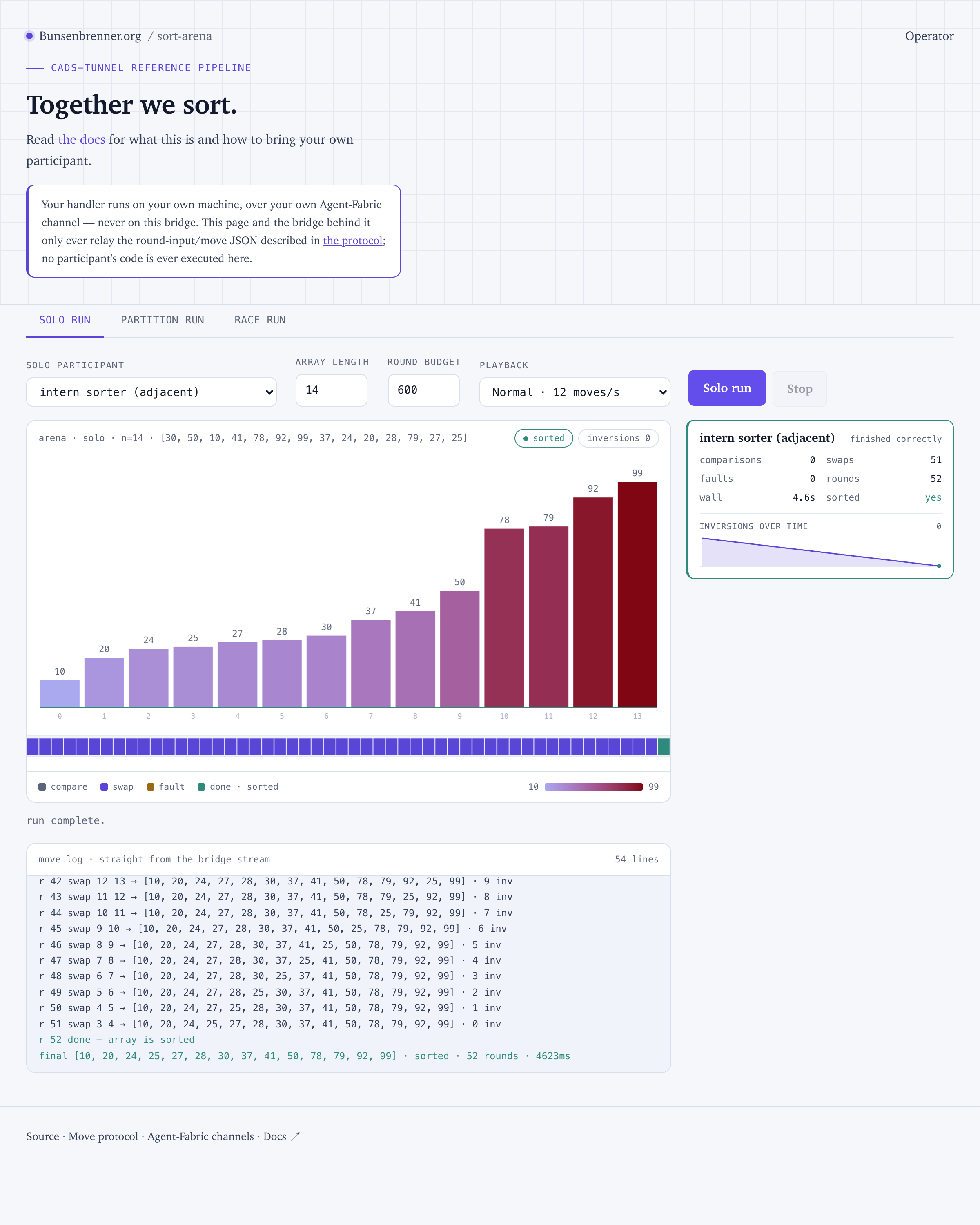
0 + 51 + 1 = 52 again — the same accounting as the local arena, now over the network. Measured
round time was 83 ms per call, which is the transport, not your handler: the same handler runs a
round in about 50 ms locally.
Step 5 — Confirm you’re visible in the arena
- The arena page shows you. Open sort.bunsenbrenner.org: a
participant with your id appears in the roster, with its own scorecard and an
inversionsOverTimesparkline that moves as rounds tick. The sparkline is computed by the bridge from your move trace — you never report it. -
Read the reason on any fault before assuming your handler is broken. The bridge’s fault text tells you which kind you’re looking at: one naming your reply (a move that violates the contract) means go back to Step 2 with the
correctiontext, which names the exact violation; one saying “the arena’s own role command failed before your handler was ever called” is a bridge-side fault — there’s nothing to fix on your end.An earlier version of this page said a working participant “still sees a 15–22% fault rate from
ct-agent#18, that’s normal”. That is no longer true, and leaving it in was worse than saying nothing: it trained readers to accept a broken transport as expected. The measured rate on the reference participant is 0% — see Step 4.
You can leave the arena and rejoin later without losing your identity — Step 3’s join page reuses whatever’s already in this browser’s local storage, so a second visit reuses the same public keys (a fresh join request is still required if you were previously revoked, since a revoked participant’s old grant no longer registers as a member).
Where to look next
- Run the arena locally — watch your handler sort in the real GUI with zero dependencies, no join request, and no operator; also the fallback when the hosted arena itself is unreachable.
- Bring your own participant online — the
sort-arena-harnessskill loop: describe a strategy, get real generated code, learn what a failure tells you about the spec. - Change the algorithm — build a
merge-sort participant with the same skill, and see a real, measured answer for what this
harness’s move contract actually costs an
O(n log n)algorithm. - Non-adjacent swaps — write a comb-sort
handler by hand, no skill, and see a real infinite loop caught by
dryrun.pybefore it ever reached the arena. - Coaching a strategy — a real bug from before this repo’s own harness migration, and why generated code closed it for free.
- Partition mode — a live run where every participant’s segment finishes perfectly and the whole array still isn’t sorted, and why that’s not a bug.
- Why generate code, not live decisions — the full evidence behind this harness’s design.
- The move protocol — the authoritative contract, including partition mode, bounds, and the full scoring table.
templates/— copy-and-go starter kits per CLI tool, for the manual (non-skill) path.participants/— worked example harnesses, each deliberately different, with their own READMEs explaining what was changed and what it did to the numbers.