Run the arena locally
Every earlier tutorial ends at local verification (dryrun.py, --selftest) plus a pointer to
Join as a participant for going live on
the hosted arena. None of them tell you about the one step in between that’s arguably the most
convincing part of the whole project: watching your own handler actually sort, in the real GUI,
entirely on your own machine. index.html’s default-selected tab is Solo run — a participant
dropdown, array length, round budget, and playback speed, driving a live bar visualization, a
round timeline, and a scorecard. This page is how to point it at a handler you’re running
yourself, no hosted arena, no ct-agent, no join request, no operator approval, no API cost
beyond your own handler’s — and it’s the honest fallback for exactly the outages
ct-agent#15 documents (CADS-DEMO-sort#22 hit four
separate ones in one 50-minute session).
Why this works with zero setup
bridge/server.js needs nothing installed — only node builtins (node:http, node:fs,
node:child_process, node:crypto) and two files beside it in the repo (server.lib.js,
attestation.js). No npm install, no package.json, nothing
else. No package.json, no build step, no install. It starts in about a second. It also already
sets Access-Control-Allow-Origin: *, with an explicit comment that the API carries no session or
secret — the local-bridge override this page describes is an intended, supported path, not
something you’re working around.
run-demo.sh is not a substitute for this. It’s the operator’s own script: it needs a real
CADS-Tunnel control-plane connection and mints a real token. This page is for running just the
bridge and the static page, pointed at whichever handlers you already have on disk.
Step 1 — start the bridge with your own participants
export SORT_PARTICIPANTS_JSON='[
  {"you":"my-handler","label":"My handler","cmd":"./participants/my-handler/handler.sh"},
  {"you":"reference-sorter","label":"Reference (insertion sort)","cmd":"./handlers/reference-sorter.sh"}
]'
export SORT_BRIDGE_LISTEN=127.0.0.1:8789
node bridge/server.js
# sort-arena-bridge listening on 127.0.0.1:8789, 2 participant(s) configured
SORT_BRIDGE_LISTEN is worth setting explicitly. Left unset, bridge/server.js defaults to
0.0.0.0:8789 — fine for the operator’s production deployment behind Caddy, but for this local,
zero-dependency path it means anyone else on your network can reach an API that will happily run
whatever handler cmd you configured. Binding to 127.0.0.1 keeps it to your own machine, which is
all this page needs.
SORT_PARTICIPANTS_JSON takes the exact same shape as the operator-curated
SORT_PARTICIPANTS_FILE — an array of {"you", "label", "cmd"} objects, cmd any executable that
speaks the move protocol on stdin/stdout. Point
it at any handler you’ve already built and verified with dryrun.py — your own from Bring your
own participant online, one of this repo’s
shipped ones under participants/ (run generate.sh first if it hasn’t been already), or
handlers/comb-sort.sh
/ handlers/reference-sorter.sh directly.
Step 2 — serve the static page and point it at your bridge
python3 -m http.server 8000
Then open:
http://127.0.0.1:8000/index.html?bridge=http://127.0.0.1:8789
The ?bridge= query param is what makes this work from a different origin than the bridge itself
(port 8000 serving the page, port 8789 answering the API) — without it, index.html assumes the
bridge is same-origin and only falls back to asking for this override when a fetch actually fails.
bridge/server.js only ever answers the API; it doesn’t serve index.html or any other static
file itself (that’s Caddy’s job in production, per Caddyfile), so both servers above are
genuinely needed — this isn’t a workaround for a missing feature, it’s the actual shape of the two
pieces this app is built from. The bridge’s own permissive CORS header exists specifically for
this two-origin case, per its header comment (bridge/server.js:1878-1883).
Step 3 — watch it sort
Select Solo run (already the default tab), pick your handler from the participant dropdown, set an array length and round budget, and run it. Real output from doing exactly this:
insertion-fan, n=12
[55,36,63,17,94,82,87,42,4,75,94,10] · 32 inversions
→ sorted · 102 rounds · 69 comparisons · 32 swaps · 0 faults · 6.0s
  (32 inversions, 32 swaps — the adjacent-swap bound, live)
This is what a finished run looks like — everything below is local, on 127.0.0.1, with no account
and no tunnel:
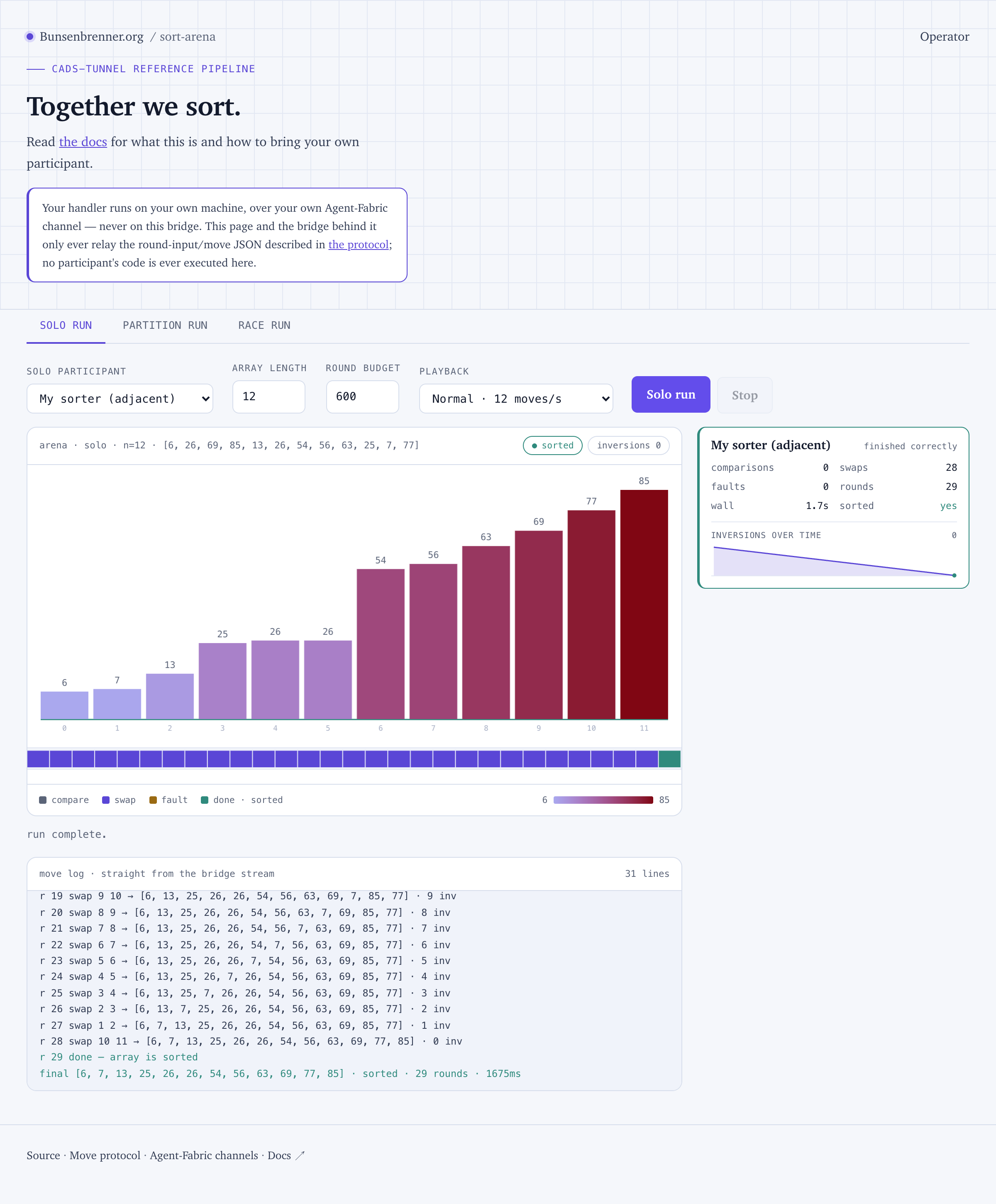
Three things in that picture are worth naming, because they are what the tutorials keep asserting:
comparisons 0 · swaps 28 · rounds 29. That is0 + 28 + 1, and it holds for every run: every move costs exactly one round, plus one for the finaldone. Rounds are not a mystery number — they are your move count.swaps 28againstinversions 28at the top left. The adjacent-swap bound, visible rather than argued.- The move log is the bridge’s own stream, not a replay the page invented.
r 29 done — array
is sorted
is the same event the scorecard was computed from.
Watching inversionsOverTime tick down while the round timeline fills in compare/swap/fault/done
colors makes whatever your tutorial’s numbers claimed land in a way rounds= alone doesn’t. This
is also exactly what Bring your own participant online
means by “reliable” — the payoff of everything the earlier verification steps were checking for.
Programmatic access
The GUI’s Solo run tab is driven by POST /run/<participant-id>?len=N&budget=M, documented in
full alongside race and partition in The move protocol.
Same NDJSON round-event stream either way — useful if you want to script a run rather than click
through the GUI, e.g. to reproduce a specific numeric claim from a tutorial:
curl -s -N -X POST "http://127.0.0.1:8789/run/my-handler?len=12" | tail -5
Once you’re ready to go live
This local setup and the hosted arena are independent — nothing here registers you anywhere. When
you want your handler reachable at sort.bunsenbrenner.org itself, that’s the separate,
self-service flow in Join as a participant.