Publish your first manifest
Goal: sign a bundle, publish it to a registry, watch the guardrail pass it — and reject a hostile one — then see it on the admin dashboard. By the end you will have done the whole supply-chain path once, and seen every step's real output.
Before: a checkout of scimbe/CADS-agent-marketplace
and a Rust toolchain. No Docker daemon is required for anything on this page.
Everything on this page is measured
Every command below was run on a macOS host with no Docker daemon on 2026-08-27, against the
marketplace at d09eecd. The output blocks are copied verbatim from that run.
1 — Start a registry
The registry is a small axum + SQLite service. It fails loud on missing configuration rather than guessing — so you set four environment variables and run it:
export REGISTRY_BIND_ADDR=127.0.0.1:8787
export REGISTRY_DB_PATH=./registry.db
export REGISTRY_BUNDLES_DIR=./bundles
export REGISTRY_WRITE_TOKEN=s3cr3t-write-token   # required on every write
cargo run -p registry
It prints registry listening on 127.0.0.1:8787 and an empty catalogue answers at
GET /manifests.
2 — Sign a manifest
A manifest is ed25519-signed by your holder key — the same key family a ct-agent already
uses for channel membership. The dev_sign example builds and signs one from environment
variables (the production ct-agent manifest CLI takes the same fields):
$ export CT_MANIFEST_HOLDER_KEY=<your holder key>   # ed25519, 64 hex
$ cargo run --quiet --example dev_sign > hello-world.manifest.json
$ jq '{name,version,installer_kind,publisher_pubkey,signature}' hello-world.manifest.json
{
  "name": "hello-world",
  "version": "1.0.0",
  "installer_kind": "compose",
  "publisher_pubkey": "f0fa325954c3761b…",
  "signature": "a7d5a33f987a7569469cd7563cc1d198…"
}
The private key never leaves your machine; the manifest carries only the public half plus the signature.
3 — Publish it
Publishing is a multipart/form-data POST with two parts: the signed manifest JSON and the
bundle tarball. The registry verifies the signature, confirms the uploaded bytes match the
manifest's signed sha256, and guardrail-scans the compose file — all before it stores
anything.
$ curl -sS -X POST http://127.0.0.1:8787/manifests \
    -H "Authorization: Bearer $WRITE_TOKEN" \
    -F manifest=@hello-world.manifest.json \
    -F bundle=@hello-world-bundle.tar.gz
{"manifest_id":"aa11aa11aa11aa11aa11aa11aa11aa11aa11aa11aa11aa11aa11aa11aa11aa11","guardrail_verdict":"clean"}
clean means the scanner found nothing that would let the service escape its own bundle. The
manifest is now catalogued.
The verdict is not the same as the signature
A valid signature only proves who signed. clean is a separate judgement about what the
bundle would do. Both must pass. See The trust model.
4 — Watch the guardrail reject a hostile bundle
Now publish a bundle whose compose file asks for everything a container should not have —
privileged: true, host networking, a world-exposed port, and the host's /etc mounted in.
The signature is perfectly valid; the bundle is not.
$ # same call — but this bundle's compose file is hostile
$ curl -sS -X POST .../manifests -F manifest=@legacy-stack.manifest.json -F bundle=@legacy-stack.tar.gz
{
  "manifest_id": "bb22bb22bb22\u2026",
  "guardrail_verdict": "evil[F.1-non-loopback-port]: String(\"0.0.0.0:9999:9999\"); evil[F.2-privileged]: privileged: true; evil[F.2-host-namespace]: network_mode: host; evil[F.3-host-path-escapes-bundle]: /etc -> /etc (outside the bundle)"
}
Four independent violations, each named. The manifest is still recorded — with its verdict — so the catalogue keeps a permanent account of why it was flagged. What a flagged manifest may then do at activation time is the trust model's job, not the scanner's.
5 — Fetch it back
A published manifest reads back byte-identical to what you signed, and its bundle's hash still matches the signed value:
$ # fetch the manifest back — byte-identical to what was signed
$ curl -s http://127.0.0.1:8787/manifests/aa11aa11aa11aa11aa11aa11aa11aa11aa11aa11aa11aa11aa11aa11aa11aa11 | jq '{name,version,guardrail:.guardrail_verdict}'
{
  "name": "hello-world",
  "version": "1.0.0",
  "guardrail_verdict": "clean"
}

$ # the bundle's sha256 matches the manifest's signed value exactly
$ curl -s .../manifests/aa11aa11aa11aa11aa11aa11aa11aa11aa11aa11aa11aa11aa11aa11aa11aa11/bundle | sha256sum
  fetched bundle : 594c554b7c6925c3038f8430dfa3993ef5c26d4e1c9682d52ed004b7000ed587
  signed  sha256 : 594c554b7c6925c3038f8430dfa3993ef5c26d4e1c9682d52ed004b7000ed587
  → match ✓
6 — The activation ledger
Every activation appends one record; the publisher ledger sums them per manifest. No payment provider is called — this is a ledger, not a checkout.
$ # each activation appends one ledger record; the publisher ledger sums them
$ curl -s .../publishers/$PUB/ledger | jq
[
    {
        "manifest_id": "bb22bb22bb22bb22bb22bb22bb22bb22bb22bb22bb22bb22bb22bb22bb22bb22",
        "name": "legacy-stack",
        "version": "0.9.0",
        "activation_count": 0
    },
    {
        "manifest_id": "aa11aa11aa11aa11aa11aa11aa11aa11aa11aa11aa11aa11aa11aa11aa11aa11",
        "name": "hello-world",
        "version": "1.0.0",
        "activation_count": 3
    }
]
7 — What the gate refuses
Two things the registry will not do, so you can see the boundary:
$ # publish with no bearer token
  HTTP 401  → rejected

$ # valid signature, but the uploaded bundle bytes were tampered with
  HTTP 400  refusing to publish: uploaded bundle bytes do not match the manifest's own signed bundle.sha256
A missing token is refused before anything is read; a tampered bundle is refused because its
bytes no longer match the signature's own sha256.
8 — See it on the dashboard
The Phase 4 admin view is a read-only window on the registry. Pointed at the registry you just populated, it shows both manifests with their verdict badges and activation counts — the registry's own values, not mock data:
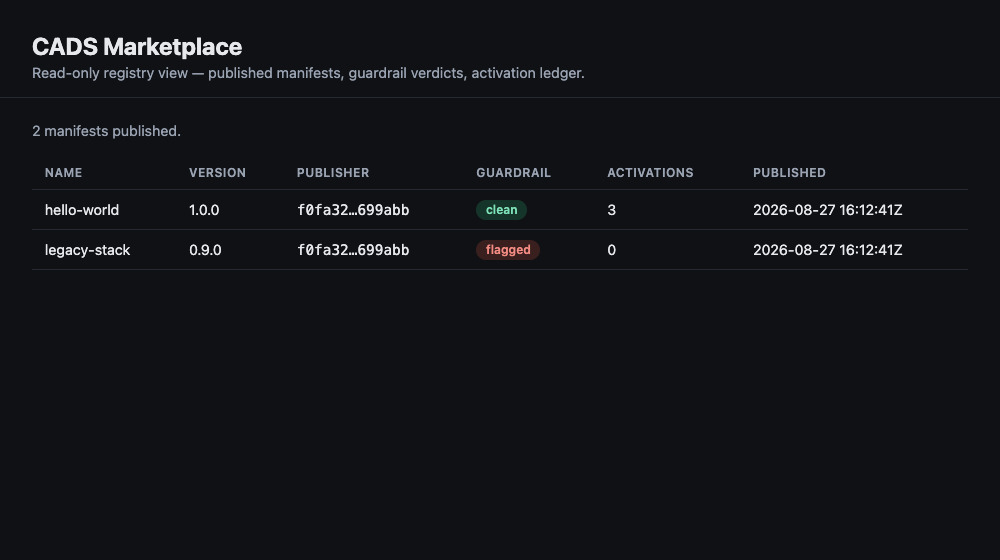
Hovering a flagged badge reveals every violation from step 4.
What you can do now
You have run the whole path once: sign to publish to scan to fetch to activate to view. Every deterministic part of that worked with no container runtime present.
Two directions from here:
- To actually bring a service up from a compose bundle, you need a Docker daemon — that step is real but was not run on this host. See Installer kinds.
- To let a bounded local model maintain a bundle's own code, see The harness and its cage — the most complex piece, and the one whose containment is worth proving carefully.